

Flipkart ads management: PLA, PCA and display
Product Listing Ads, Product Contextual Ads and display, run on margin after commission.
Who it is for: Brands selling on Flipkart, including Flipkart Minutes for quick delivery.
Services
All servicesMore
IndustriesResultsHow we workPricingFree toolsAboutContactProduct Listing Ads, Product Contextual Ads and display, run on margin after commission.
Who it is for: Brands selling on Flipkart, including Flipkart Minutes for quick delivery.
Each one used where it earns.
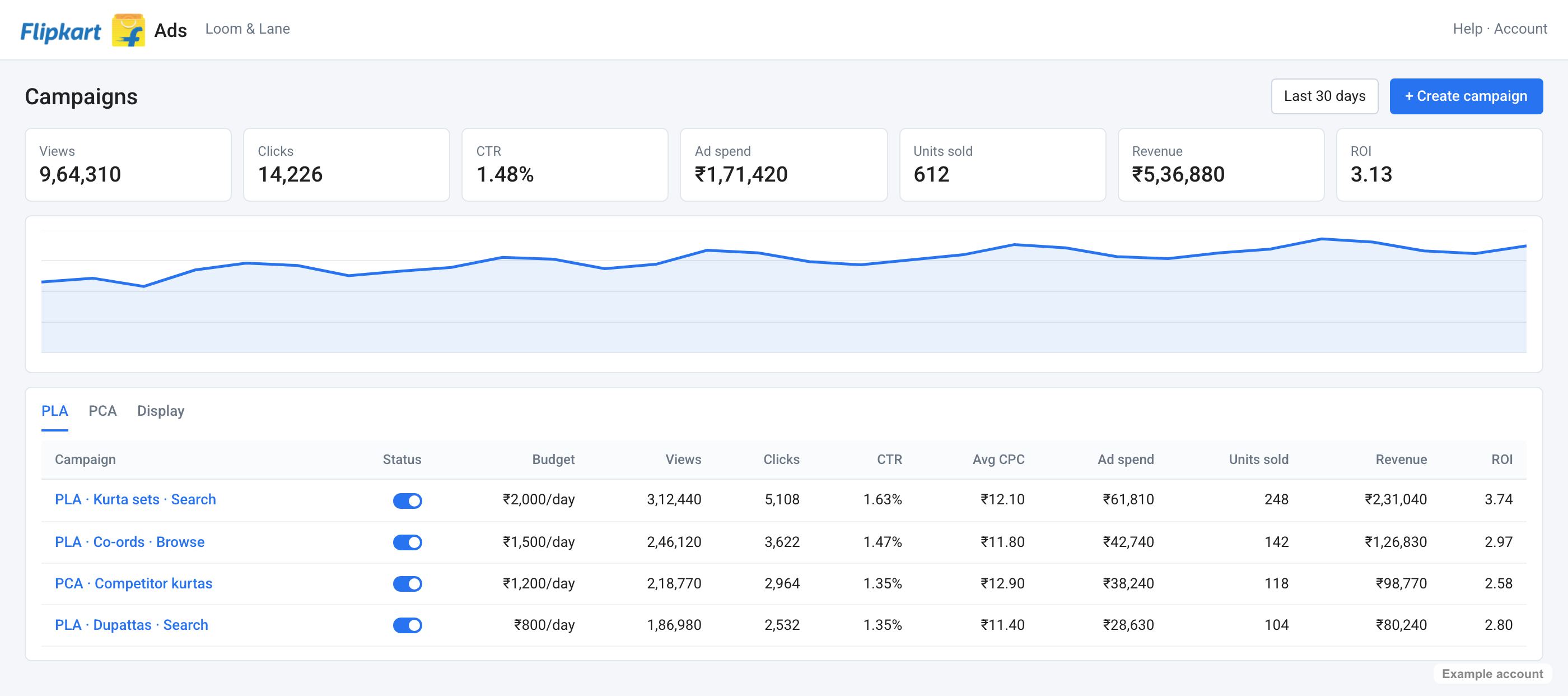
Cost-per-click ads that look like regular listings in search, browse, the homepage and product pages.
These ads appear on product pages of related or competing products, chosen by category and co-purchase patterns.
Banners on the homepage and category pages, used for launches and sale events.
Flipkart's retail media suite that brings formats and attribution into one place.
Step by step, in the order we do it.
We check titles, images, specifications and ratings first. Ads send shoppers to the listing, and a weak listing wastes the click.
Product Listing Ads run on bestsellers and high-margin products, with bids set by margin rather than by sales.
Product Contextual Ads place your product on related and competing product pages, where shoppers are already comparing.
Display and brand placements are kept for launches and Big Billion Days, when reach matters more than cost per click.
Products with high return rates get lower bids. A returned order costs fees in both directions, so it can lose money even at a good ROAS.
Checked in October 2026, with the source for each.
Product Listing Ads appear in search and browse results. Product Contextual Ads appear on related product pages and in the cart.
Source: Flipkart Ads
Flipkart introduced a scheme that lets eligible sellers run ads and pay the following month.
Source: Storyboard18, 2025
Run by a senior marketer with five accounts at most.
Flipkart commission varies by category, so margin per product varies too.
Brands that disappear between events lose rank and pay more when the sale comes.
Competitor product pages are where shoppers compare. Most brands never show up there.
You see ROAS and contribution margin side by side, every week.
Weekly
ROAS and margin by channel, what changed, what is next.
Monthly
It compares results against your targets and sets next month's roadmap.
Quarterly
Realistic numbers from your own data, checked against what actually happened.
How Flipkart ads usually starts, from the free audit to the first quarterly plan.
Week 1
Weeks 2 to 4
Month 2
Month 3
The same operating rhythm on every account, from the first week.
Owns your account and your targets, with five ad accounts at most.
ROAS next to contribution margin, what changed and what happens next.
Every channel in one view, so you never wait for the weekly call.
Results against the targets agreed in writing, and next month's plan.
Projections built from your own numbers, checked against what happened.
Day-to-day questions answered by the person who runs your account.
| Typical agency | In-house team | Your growth teamMobile First | |
|---|---|---|---|
| Bids based on | The ROAS shown in the Flipkart console | Gut feel | Each product's margin after commission, fees and returns |
| Bid changes | Weekly, or at review | When there is time | Daily on Flipkart |
| Out-of-stock products | Ads keep spending | Noticed when sales drop | Paused as stock runs out |
| Reporting | One Flipkart report | A spreadsheet stitched together monthly | One profit report with Flipkart, your website and other channels |
Each industry page covers the season, channels and checks for that category.
Product Listing Ads are Flipkart's main sponsored format. They look like normal product listings and appear in search results, browse pages, the homepage and product pages. You pay per click, so the bid and the listing quality together decide how often you show.
PLA is triggered by what shoppers search and browse. PCA, Product Contextual Ads, appears on the product pages of related or competing products, chosen by Flipkart based on category and co-purchase patterns. PLA captures demand; PCA wins shoppers while they compare.
We build rank and reviews in the weeks before, set event budgets from last year's data and your margins, and plan bids by hour during the sale. Spend stops on products that go out of stock or fall below break-even.
Yes. Flipkart Minutes is Flipkart's quick commerce service, and we plan it alongside your Blinkit and Zepto spend so the same product isn't bidding against itself across platforms.
We run Product Listing Ads, Product Contextual Ads and display ads, and plan event packages for sale events.
From each product's margin after commission, so we never bid more than a sale is worth.
Yes. We fix titles, images and keywords that hold ads back before raising spend.
On margin after commission and returns, alongside your website and other marketplaces.
No. PLA is charged per click, and we set budgets per product after the audit.
Yes. We plan for every major Flipkart sale, with stock checks and margin limits for each product.
Five questions, no email needed. You get an honest answer on screen.
Great fit
Book 30 minutes and we will read your accounts before the call.
Book a callGood fit
You keep the findings either way.
Book a callNot yet
Our free tools will show you where your money goes today. When you cross ₹5 lakh a month, come back and we will read your accounts. If you would like advice before then, we are happy to talk.
Tell us about your brand. We read your accounts before the call, so it is about your numbers.